top of page

Motivatzi Fitness App
UX/UI Case Study

Find your next perfect workout match and reach your goals.
Your daily motivation boost - train better, feel stronger, together.
The idea
The idea for this project began with a simple question about my personal motivation: why is it often so hard to stay consistent with workouts, especially when training alone?
After researching and reflecting on my own experience, I decided to create an app that helps users find workout partners.
I conducted interviews with friends and family, and the main insight that emerged was clear: people feel more motivated when they train with others. It creates a sense of challenge, friendly competition, and shared enjoyment.
After receiving positive results about the workout partner concep, I started designing the app’s structure and interface, focusing on providing users not only with an easy way to find a training partner, but also with a smooth, comfortable, and enjoyable user experience.
App Identity & Target Audience
The name I chose for the app is “Motivatzi”, inspired by the word motivation.
I chose orange tones for the app’s color palette because orange represents energy, enthusiasm, and positivity - all the feelings that reflect movement, motivation, and an active lifestyle.
The target audience includes people aged 18 to 35 - both those who already work out and those who want to start but feel hesitant or lack motivation to train alone.
The app aims to connect like-minded individuals and help them stay consistent, confident, and inspired throughout their fitness journey.
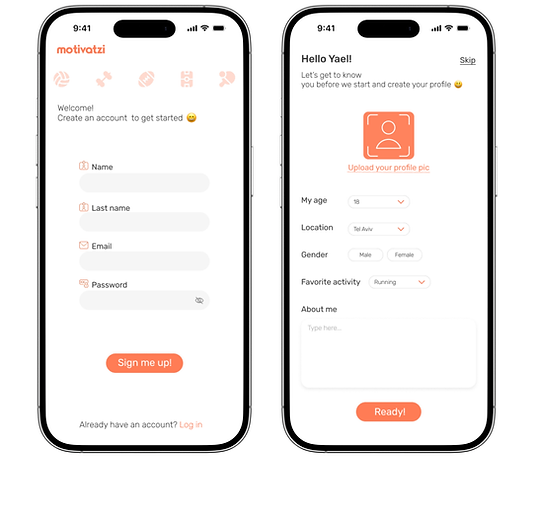
Log in/sign
up page
Profile Setup & Getting Started
App Design & User Flow

At the top of the screen, there are two buttons - one that leads to the chat section and another that opens the menu, which includes settings and workout history.
Below the welcome message, users can find a favorites bar for quick access to saved profiles.
Next comes a search bar with filter options, followed by a feed that shows sports activity posts based on the chosen filters and date.
At the bottom, there’s a navigation bar that includes four main icons: Home, Post, Favorites, and My Profile.
Home page


My profile
My favorites
My post
After the user selects a sports activity they’re interested in, a new page opens with more detailed information about the activity and the person who created the post.
At the bottom of the screen, the user can view other time options for the same activity on the same day, with the ability to change the date up to three days ahead.
Once the user finds an activity, and a partner, that feels like the right match, they can easily join it by tapping the “Join” button.

Info & Join page
And congratulations you’ve joined a sports activity!

Congratulations page
Other Functions of the App
The chat

Personal chat
Chats page
After the user joins a specific sports activity and the creator of that activity approves the request, a shared chat opens between them.
In this chat, users can discuss details about the workout, and get to know each other before training together.
If at any point one of the users feels uncomfortable or decides not to participate, there’s an option to delete the chat for both sides immediately, ensuring a safe and worry-free experience.
In the chat page, users will only see conversations with people who have approved their participation in a specific activity.
Filters

On the home page, in the filters button, users can find various filtering options such as time, type of activity, location, gender, and more.
To ensure maximum convenience, the app provides a wide range of filters that help users easily find and match the most suitable activity for their preferences and schedule.
Filter window
History

The History Page, which can be accessed through the menu button at the top of the home screen, allows users to view the activities they have joined as well as those they have posted on the same day.
Users can also view upcoming activities for up to three days ahead by adjusting the date in the date bar.
History page
This is the screen the user sees when they get a notification that someone has requested to join one of their posted activities.
The user can then decide whether to approve or decline the request. Before approving, they can also view the person’s profile to get to know them better.

Another point of view
About
The “Motivatzi” app was created through a thoughtful UX/UI design process that focused on user needs, visual consistency, and intuitive interaction
Throughout the design process, I aimed to create a product that not only helps users find the perfect workout partner but also keeps them motivated and engaged through an intuitive and enjoyable interface:
The color palette, interactions, and typography were carefully chosen to reflect energy, positivity, and movement, while maintaining a clean, modern design aesthetic.
My design process combined research, user flows, and wireframing to create a experience that helps users find workout partners easily and stay inspired.
I built an experience that encourages people to connect, stay active, and enjoy their fitness journey together.
Design system
The design work was done in Figma
Fonts & typography
"RUBIK" light
"RUBIK" regular
"RUBIK" medium
Font sizes
size 12 body text
size 14 body text
size 16 body text
size 18 sub header
size 20 header
Color palette
#FF7C55
#FFA286
#FFDCD2
#575757
#F6F6F6
Font colors
Header
#272727
Sub header
#3A3A3A
Body text
Disabled
#6D6D6D
#ACACAC
bottom of page